Wednesday, May 14, 2025

Marshall Breeding's 2025 Library Systems Report

On May 1, Marshall Breeding released the 2025 Library Systems Report. For decades, this report has summarized the state of the library systems market, highlighting changes and trends. Over the past several years, the key trend has been consolidation of the marketplace as larger companies and investment firms have acquired smaller system vendors to expand customer bases and absorb technological innovations into their existing suite of offerings.

This year, however, the dominating trend seems to be stability. As Breeding points out, private equity firms have largely cashed out of the market, selling their products to larger, more stable companies that are interested in long-term development and growth over fast profits. Despite that, Breeding predicts at least some mergers in the next few years, especially as the smaller privately-held companies reach a point where founders and generational leadership wind down. Breeding also predicts acquisitions of companies that have developed technologies outside of libraries that library systems vendors wish to incorporate in their next-generation offerings.

Most of the new technologies being developed for inclusion in library systems, as Breeding points out, are related to AI. Examples include:

  • Alma Specto: A digital collections management platform slated for release by early 2026 that Ex Libris is developing in partnership with other institutions.
  • Primo Research Assistant: Ex Libris' discovery add-on that can combine results from their Central Discovery Index with AI-generated summaries and suggestions. 
  • Natural Language Search and AI Insights: EBSCO's AI-assisted search interface and summary tools have completed extensive beta testing and are expected to be rolled out to all EBSCO customers by the end of the year.
Despite acknowledging the growing inclusion of AI in library systems, both in collections management and discovery, and admitting that AI tools could supplant existing technologies and give the competitive edge to the companies with the best implementations, Breeding concludes this year's report with a word of caution about these tools:

"Libraries will have to carefully parse which technologies can amplify their work and which may do harm. They are already working closely with vendors to ensure that products and services with AI features deliver appropriate results. Having the ability to automatically generate descriptive metadata at a speed and scale not previously imagined is an attractive prospect, but these tools must be accurate."

That is an astute point. AI is still prone to "hallucinations" and many users still misunderstand how AI works and blindly trust the results without double-checking, to their potential peril. A recent high profile story about a law firm that faced a $31,000 sanction for allowing hallucinations to slip into their filings demonstrates this point. It was not an isolated incident as other recent stories show. 

Wednesday, November 20, 2024

Tariffs and Library Technology

Anyone whose job involves dealing with library technology, either paying for it or maintaining it, has likely given some thoughts to the president-elect's vow to impose tariffs on imported goods. The proposed tariffs are more sweeping than he was able to accomplish in his first term. The most repeated promises are a 60%-110% tariff on Chinese goods, and a tax of between 10% and 20% on every imported product. In a report published just before the election by the Consumer Technology Association, the proposed tariffs could lead to the following price increases for some of the technology that libraries often buy.

  • 45% for laptops and tablets
  • 31.2% for monitors
  • 6.2% for desktop computers
  • 10.9% for computer accessories, such as speakers, headphones, printers, and scanners
Of course, specific impacts on individual libraries could vary greatly based on the institution's purchasing power and contracts with suppliers. It seems likely, though, that most libraries would see increases, with smaller libraries being hit proportionally harder. It's also conceivable that library resource providers, print and electronic, could increase prices to offset their own growing technology costs.

There are some obvious things libraries could do now to mitigate these likely increases to their technology costs.
  • Buy now, before the tariffs have a chance to go into effect. If resources are available, buy new or upgraded technology now to avoid paying more later. 
  • Negotiate with suppliers. If possible, speak to vendor representatives about extending contracts or agreements at current, or marginally higher, costs to avoid larger increases in the coming years. If applicable, make sure any maintenance contracts with vendors are up to date to cover repairs and avoid having to purchase replacement devices.  
  • Make do with current technology. Investigate strategies to increase the life of the technology already bought and paid for. Work with the institution's IT professionals to strategize how to make current devices run better and last longer. These recent articles offer some easy tips on how to extend the life of devices:

Tuesday, August 20, 2024

AI Assistants in Discovery Tools

Our University library recently announced a pretty substantial upgrade to the Primo discovery service and since the College of Law library shares that system, we’re along for the ride. One of the new features that caught my eye is the Primo Research Assistant, a generative AI-powered tool that promises to make library research and discovery easier for the growing number of users who are getting accustomed to asking natural language questions in other AI platforms. Rolling out later this year, the Primo Research Assistant “provides immediate answers to natural language queries and offers visibility into sources and references, so libraries can empower users with a seamless discovery experience, grounded in trusted content, and advance institutional scholarly goals,” according to the announcement posted on the ExLibris blog earlier this summer. 


The blog post offers a quick overview of how to use Primo Research Assistant and what it can do for users. When a library user enters a search in the usual Primo interface, they will get the option to engage with the Research Assistant. The Research Assistant interface will give the user prompts and options on furthering their research. As the user refines their query, the Research Assistant will provide summaries based on available library resources, with links to full-text resources. ExLibris plans to add new features as AI continues to evolve it’s capabilities. 


Other discovery services are planning to integrate generative AI into their products, if they haven’t done so already. ProQuest, another company under the Clarivate umbrella with ExLibris, this summer announced further developments in its own ProQuest Research Assistant, which had been in beta-release since February. Indeed, Clarivate is integrating this type of AI-powered research assistance in many of its products. Outside of Clarivate, other companies are making AI assistants a bigger part of their discovery products. For example, OCLC recently added AI-generated book recommendations to its WorldCat discovery service. A recent post on Library Journal by Matt Enis, AI on the Horizon, is a good overview of how many library technology companies have integrated generative AI into their products, both internal-facing and public-facing. 


Friday, May 24, 2024

Digital POWRR Institute

 Jaime Valenzuela is the Archivist and Scholarly Communications Lead at the Cracchiolo Law Library at the University of Arizona. In this guest post, he writes about his recent experience attending the Digital POWRR Institute on building digital collections and how it applies to his work in an academic law library.

I am a solo archivist at the Daniel F. Cracchiolo Law Library and my responsibilities include documenting the life of the law school. Preservation is included in that responsibility so that others may access that life in its many forms in the future. Much of that life is now being produced or captured digitally. For a law library fortunate enough to find itself responsible for documenting its history, digital preservation is a key piece of responsible stewardship. 


Earlier this year I had the opportunity to attend the Digital POWRR (Preserving digital Objects With Restricted Resources) Institute at the University of Arizona. The Institute is designed for librarians and archivists to build skills for curating and preserving digital collections under the tutelage of Digital POWRR project staff. Topics of lecture and discussion included digital preservation policy, storage solutions, hardware obsolescence, and integrity. 


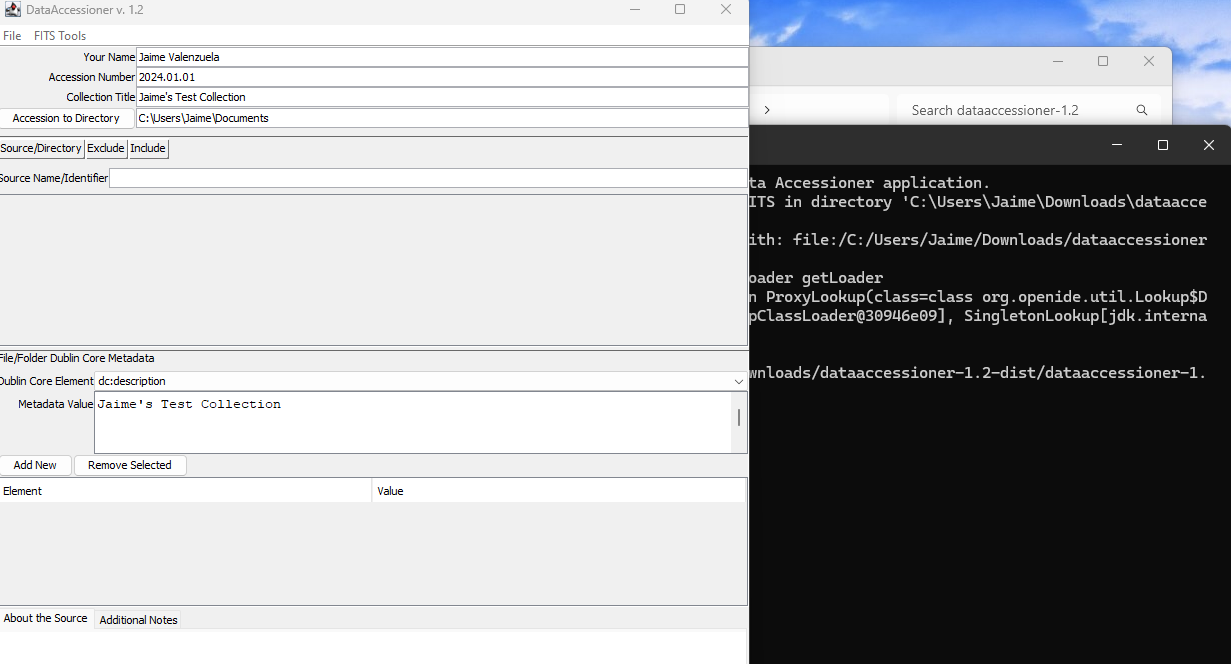
One of the best aspects of the Institute was the “Walk the Workflow” demonstration of a digital preservation tool called DataAccessioner. This open-source tool is designed to create a copy of the files that live on external media to a new file location such as a shared network drive. Important features of DataAccessioner include the ability to enter descriptive metadata following the Dublin Core metadata schema and the creation of checksums of the file being migrated from one location to another.


To actively participate in the demonstration, I downloaded and installed the latest version of OpenJDK (a freely available version of java) and a legacy version of DataAccessioner to my personal laptop. For tool testing purposes, I choose to use my personal laptop to bypass any administrative privileges associated with my institutionally owned work laptop. With software installed, I used pre-selected files shared with all Institute participants to use during a live end-to-end demonstration of the workflow. The workflow was also distributed physically allowing for a secondary form of instruction and to serve as documentation for use in the future. Screenshots were included in the documentation, and the files that participants used were the same files used in the demonstration. With the help of instructors, I was able to successfully create duplicate copies of the material I worked with. Having the opportunity to test drive a tool such as DataAccessioner under the guidance of instructors was the highlight of my Digital POWRR experience. 


Another great take away from the Institute is the “POWRR Plan.” The POWRR Plan is a personalized and actionable preservation plan that attendees work on in consultation with POWRR instructors to take home to their institutions allowing attendees to use some of their new found knowledge and take action. The plans include both short and long term goals that span form one month to twelve. 


One of my short term goals within my POWRR Plan was to properly document the digital objects under my stewardship. Using an existing internal LibGuide created for the purposes of documenting library workflows, I included a section titled “Digital Material: What it is and Where is it Stored?” One of my long-term goals is to create a statement on preserving digital collections at my law library. Having such a statement will help ensure that digital preservation is a part of my law library’s core philosophy within archives and special collections.


Friday, February 16, 2024

Non-Library Technology Solutions to Library Problems

When looking for technology to address a library problem, I was recently reminded of the tendency to look for answers in old, familiar places. However, that doesn’t always lead to a good solution to the problem at hand. Sometimes, the best answer to a library problem can be found in a different area entirely.

While reviewing safety practices following a few significant security incidents on campus, access services staff identified a need for a way to call other staff for assistance. In situations where it would be unwise to step away from the service desk to get someone from their office to assist, there was no good way to summon that help. These situations would include demanding patrons, suspicious behavior, or other activity that wouldn’t warrant calling campus police but should not be left for one person to deal with on their own. 


In trying to find a way to address this need, existing library technology infrastructure was the obvious place to look first. The landline phones were considered but dismissed because they are not discreet to use and it’s not always readily known who is in their office and available to go to the desk. The service desk is also equipped with a “panic button” but that was ruled out quickly as well since it is connected directly to campus police. Its intended use is for more urgent, more serious situations. 


The first step in expanding our thinking to find a solution was, pretty obviously, to look at devices specifically designed for security. However, those devices also proved to be a sledgehammer instead of the scalpel we were looking for. They were also prohibitively expensive. 


Much like conducting a reference interview, we had to get past the question being asked and determine what the real need was. In this case, it was simply a way to alert others that assistance was needed. With that in focus, our head of access services identified a solution that works for us: a medical call button. 


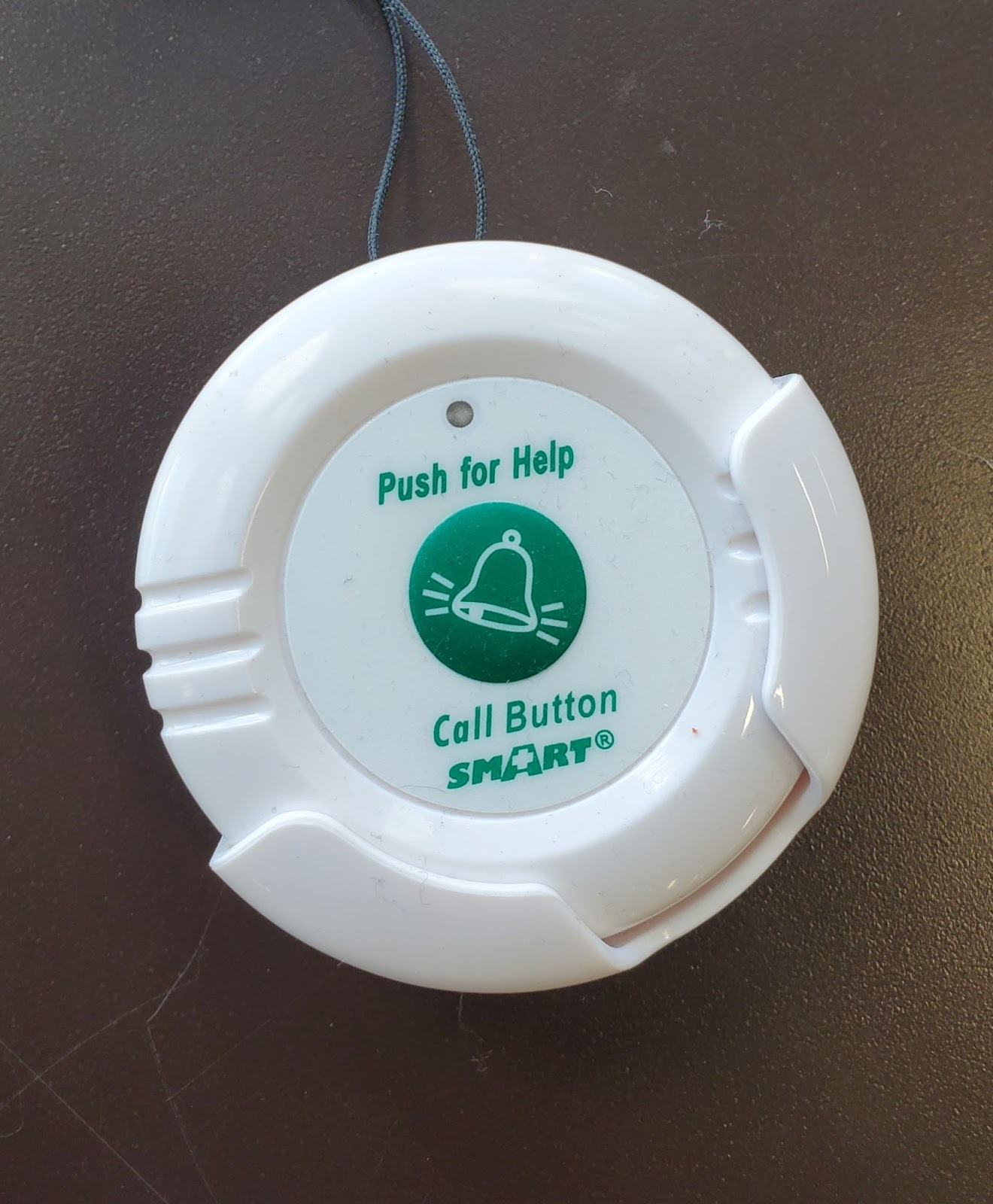
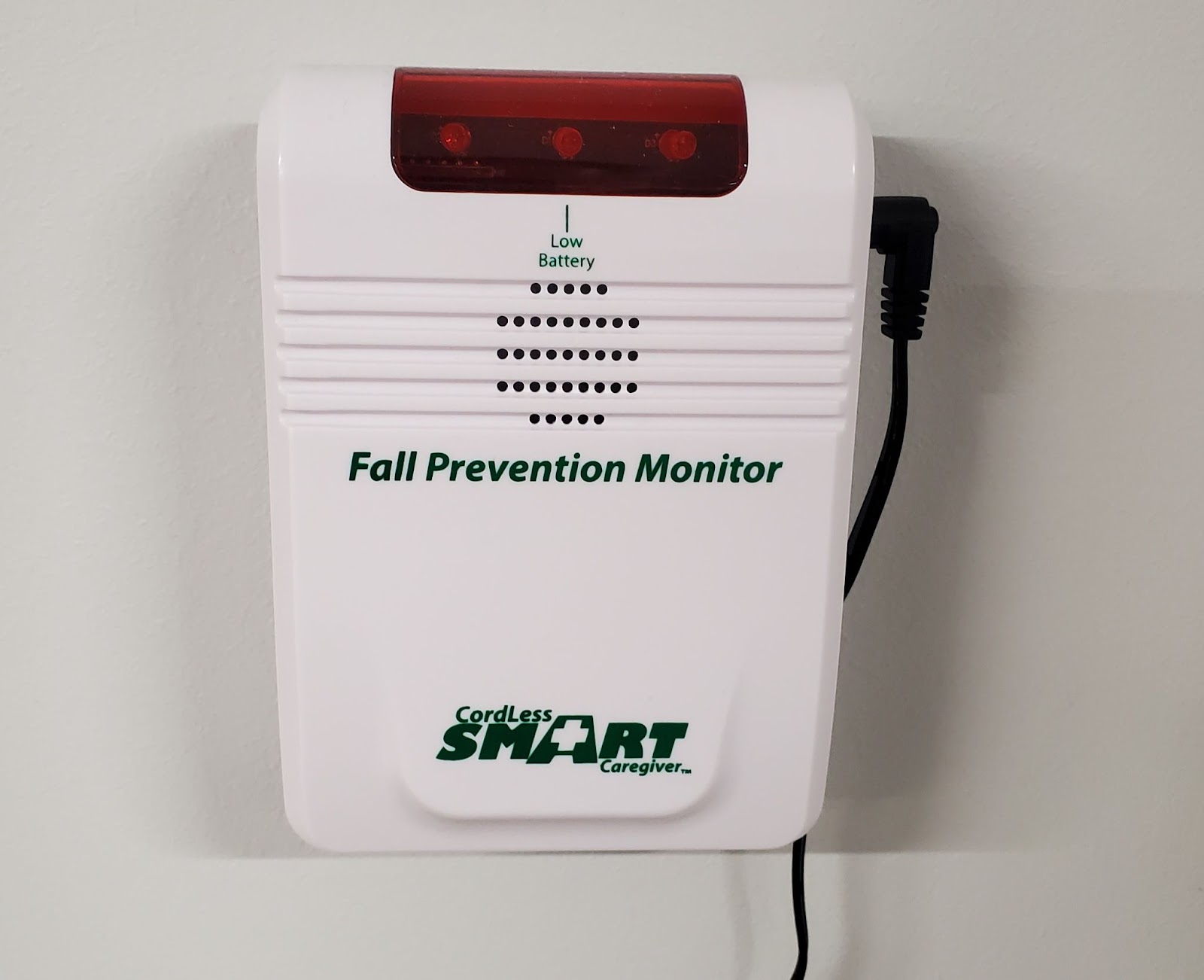
Technically designed as a way for people with mobility problems to call for assistance and avoid risking a fall, this device also answered our need. The small call button is mounted under the service counter and can be reached easily and discreetly. When pressed, it activates a quiet yet still noticeable chime in the office suite area behind the public service desk. It chimes until someone responds and resets it. 


This device perfectly met our needs. Access services staff now have a way to call for assistance if necessary and the peace of mind knowing that help is easy to summon. As an added benefit, this medical device was significantly more affordable than alarms designed and marketed as security devices.


Sometimes, a library problem can best be addressed by technology that wasn’t specifically designed for libraries. This situation was a good reminder to look beyond the familiar for solutions. 


Friday, July 7, 2023

GIS and Land Grant Research: The Evolving Role of Technology in Law Librarianship

Samantha Ginsburg, Law Library Fellow at the University of Arizona's Cracchiolo Law Library, has been participating in a large project to gather data about the University's land-grant status and its impacts on Indigenous communities. She has authored this guest post to share her experience using GIS systems to present this data in a clear, visual way. Applying GIS in this innovative way is a first for the library and can serve as a model for others. 

In the last year, the Daniel F. Cracchiolo Law Library undertook a significant task: researching and realizing the University of Arizona’s land-grant history and its impact on the state’s Indigenous peoples. The goal was to convey this information in an informative, transparent, and interactive manner. Recognizing that the essence of the land-grant concept revolves around land itself, our team made a deliberate decision to harness the power of maps and Geographic Information Systems (GIS) as the most effective means of presenting our research. Previously, I had limited experience using GIS from undergraduate coursework and infrequently encountered geospatial applications in my professional role as a criminal paralegal. This endeavor demanded a level of skill beyond what I was capable of. Fortunately, my supervisor, Cas Laskowski, is a mapping expert in addition to serving as our Technology & Empirical Librarian. We were able to navigate this ambitious project together, and as a result, I was able to continue learning and gain a deeper understanding of GIS technology. Ultimately, it became the perfect opportunity to see the practical application of how geospatial data could be used in an academic law library environment. 

To provide some additional context, this project was in response to the compelling article by High Country News (HCN) titled “Land-Grab Universities” and their subsequent investigation into land-grant universities across the United States. Using the HCN data as a starting point, we realized the uniqueness of Arizona’s land-grant history and that the quantity of land transferred to the state for purposes of higher education surpassed our original assumptions. While some tracts have been sold or swapped over time, most of the land remains managed in trust by the AZ State Land Department. I used the Bureau of Land Management’s General Land Office Records (BLM GLO) Automation web site to locate and verify the parcels that were periodically selected in the years following Arizona’s statehood. I was able to identify most of the land parcels throughout the state and the authority under which they were granted. Next, I created a data set from the BLM Control Document Index records drawn from the state selection list. Once I completed “data scraping,” reformatting, and cleaning the BLM land data into our dataset, Cas turned the data into a shapefile (a geospatial vector data file format).

We used ArcGIS, a powerful GIS software developed by Esri, to capture and manage our geospatial data. Additionally, creating the maps based on the BLM data required advanced skills and techniques that went beyond the functionalities of the software. For instance, converting raw tabular data into a shapefile that would display geospatial information demanded the use of a computer programming language. To achieve this, Cas crafted a Python script enabling ArcGIS to read and interpret the data accurately and present a geospatial representation on-screen. Throughout the process, we collaborated closely addressing any errors or challenges that arose. Cas generously shared her expertise, teaching me invaluable troubleshooting techniques applicable to both coding and data engineering. Once the maps were created, we seamlessly integrated them into ArcGIS StoryMaps, another product offered by Esri. StoryMaps is a web-based program that allows its users to create and feature maps alongside engaging narratives and other multimedia content. Our StoryMap, titled University of Arizona Land-Grant Project: Tracking the History of Land-Grant Enrichment at the University of Arizona, is now available to view through the Daniel F. Cracchiolo Law Library’s Special Projects’ page.

The impact of leveraging geospatial data goes far beyond historical projects like this one. Such technology within an academic law library setting can have profound benefits for law students and faculty.  In subject areas such as real and property law, water and environmental issues, and particularly indigenous law, where border matters and sovereignty are pressing topics, geospatial data can play a pivotal role. The use of geospatial technologies revolutionizes a traditionally paper-heavy profession, ushering in a new era of interdisciplinary work. As a Law Library Fellow, essentially a novice librarian in training, I had the incredible opportunity to use our library resources and now understand the implications of what data-driven librarianship can do. Law libraries, by teaching and supporting law students in technologies like GIS, can foster significant advancements within the legal profession and shape a more dynamic and progressive future.

-Samantha Ginsburg

Thursday, May 18, 2023

Thinking about the Future of Integrated Library Systems

 Two significant pieces regarding the current state and possible future of integrated library systems (ILS) were recently released. Taken together, these pieces show somewhat of a shift in the trajectory of ILS development. One on hand, the long trend of consolidation and shrinkage in the number of available systems continues, although at a slower rate since the major players have already consolidated. On the other hand, there are signs of cracks at the base as some libraries explore whether one integrated system can ever meet all their business and service needs and whether they want to be constrained by the development schedules of the major system vendors.


The first recent piece to discuss these trends is from Marshall Breeding. His 2023 Library Systems Report  was published on May 1. This long-running, always useful report, is a thorough documentation of the current library system marketplace and well-informed discussion about potential future developments. There are no real surprises in this year’s report. As Breeding states, proprietary systems from large vendors continue to dominate the market. But the report demonstrates that a growing number of libraries are choosing open source systems when they migrate from older systems. Currently in the U.S., approximately 10% of academic libraries and 17% of public libraries use an open source system but that number is expected to grow as the historic barriers to these systems are dismantled. Long periods of development for these systems have finally got them to a place where functionality and customization options rival those of proprietary systems. The big development in this area, as detailed in the report, is how EBSCO’s support of the development of the open source system FOLIO is finally bearing fruit as a growing number of large libraries and consortia are migrating to FOLIO hosted by EBSCO. This gives them the flexibility of an open source system without the still-costly overhead of maintaining one. 


Meanwhile, a two-part post by Andreas Mace at Scholarly Kitchen, Do Libraries Still Dream Unified Dreams, approaches the questions of ILS flexibility and customization from a different angle. It begins by posing the question, can any one system ever perfectly meet a library’s needs? For decades, the idea of one system running all functions has been the ideal that librarians and ILS vendors have tried to achieve. Lately, as demonstrated in the 2023 Library Systems Report, the focus has been on developing open source systems with flexibility and interoperability to meet that goal. What Mace describes in the second part of his post is a modular approach using a suite of integrated platforms; one for interlibrary loan, one for circulation, one for acquisitions, etc., all united seamlessly by open APIs and exchange-ready data standards. This modular approach would potentially allow libraries to more fully develop and customize the modules that are most crucial to their unique business practices without being tied to a development schedule for a larger integrated system. 


A takeaway from reading both these pieces in conjunction is that, after years of seeing ILS development dictated by the contracting number of vendors in the marketplace, change and a different approach may be on the horizon. Going forward, ILS development may depend more on the growth of open source solutions, especially smaller scale platforms that can be tied together as modules, creating the “perfect” ILS for each individual library.   


Monday, February 20, 2023

AI Cataloging and Technical Services

There has been a lot of discussion lately about artificial intelligence (AI) and the law and legal education. My colleague Sarah Gotschall has written extensively about various facets of the intersection of law and AI, asking if AI can make legal practice less stressful; what does AI think a law librarian looks like; and even getting AI to wax poetical about the state of the profession. 

Most of the AI discussion I've read has centered on its impact on education and the practice of law. Those areas are significant but outside of the kind of law library work I and my department does. I decided to see how AI would fare at doing traditional Technical Services work. To that end, I asked ChatGPT to do a fairly simple task: catalog a recently purchased book for our collection. 


There seemed to be some confusion about the difference between a bibliographic record and a citation. To ChatGPT's credit, it did give me two examples when I only asked for one, albeit two wrong examples. I clarified the question and asked for a bibliographic record in MARC format. 


To my surprise, ChatGPT began constructing a line by line MARC record before my eyes. I was incredibly impressed and my mind began reeling with questions about the implications for human catalogers. MARC was developed back in the day to be machine readable so it made sense that something as seemingly sophisticated at ChatGPT would have already assimilated it and become proficient at using it. But then I began to wonder if ChatGPT had access to OCLC and was just copying the OCLC record. Still, pretty impressive since copy cataloging is the vast bulk of what our human cataloger does in this library. 

But then I took a closer look at the record. I noticed the date of publication seemed off. Then I realized the publisher was wrong. The record includes ISBN numbers that don't seem to exist. It also includes an OCLC number that does not exist. To ChatGPT's credit, it did warn me that the record might need some editing. On the plus side, some of the subject headings are accurate and the call number is in the ballpark.


My library does require correct publication information. Doing a little research on this book, it seems to have grown out the author's previous article on the topic. Maybe ChatGPT was confused by the publication history but I couldn't find any connection between this work and New York University Press. Upon further questioning, ChatGPT said it pulled the information about this book from the LC Catalog. However, LC has the correct publication data. So while at first look, this looks like a good record for this title, it seems to be a fabricated mix of true and untrue elements, with AI filling in gaps. Imagine if human catalogers did the same. 

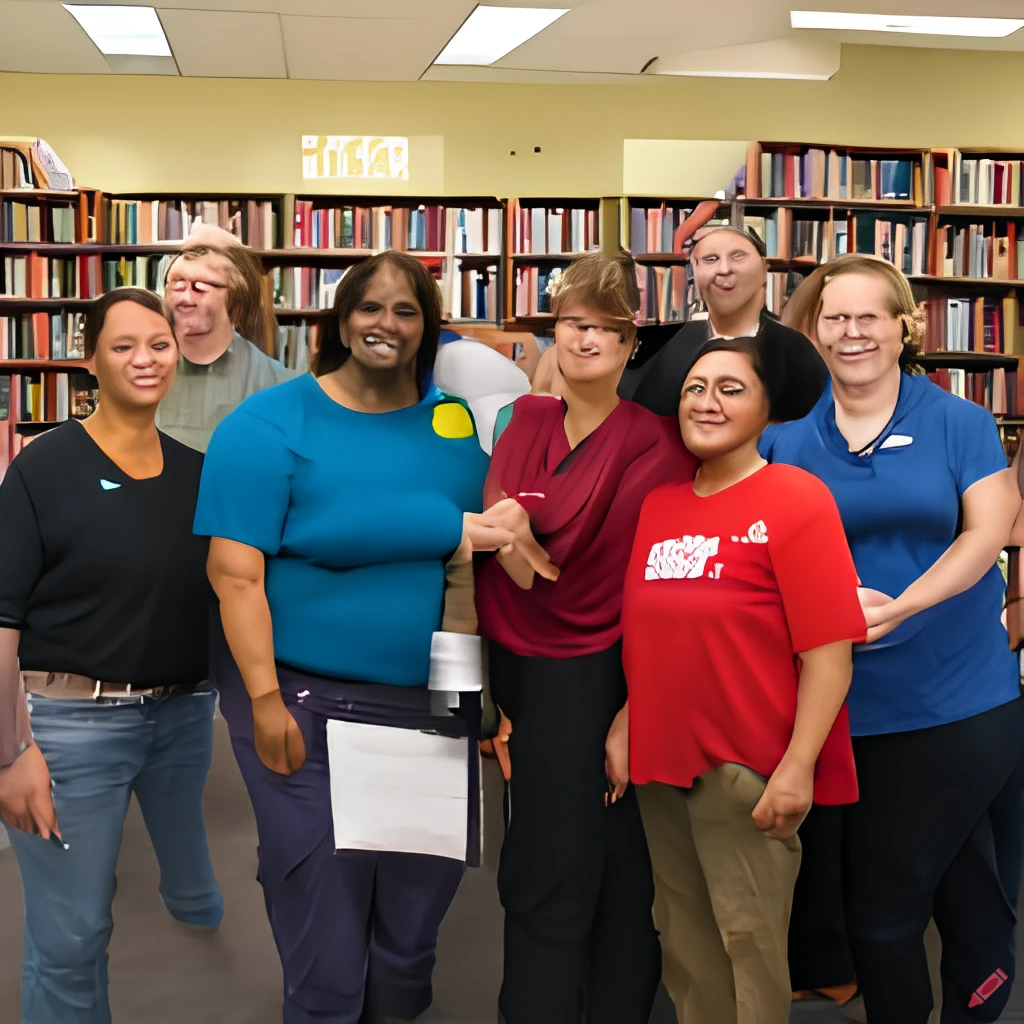
Speaking of AI making something out of nothing, I also experimented with DallE. My colleague had previously asked it to generate images of law librarians. I got more specific and asked for an image of "Technical Services librarians celebrating a successful reorganization of their department."


This AI seems to have a very specific idea of what a Technical Services librarian looks like. Biases in AI generated art have been well-documented and I think we can see a little of that in these examples. After these two experiments, I reached the same conclusion as my colleague: AI is still very much a work in progress. I'm not quite ready to worry about AI taking Technical Services librarian jobs. 


Wednesday, September 28, 2022

Making your invisible collection visible with Library Search by PowerNotes

Getting our patrons to use our online catalogs can be a challenge, making much of our collections invisible. This summer, PowerNotes unveiled the new “Library Search” feature (conceived by Richard Leiter). When the patron enables the Library Search feature and performs a search in Google or Google Scholar, a PowerNotes box will show the top ten results from the patron's library on the same page along with the Google search results. The library results and the “see all results” link takes the user straight to their library’s catalog. This feature enables libraries to highlight their holdings without having to do anything beyond instructing patrons to turn on the feature in their PowerNotes extension. 

Along with making our collections more visible, the feature allows libraries to meet the users where they are (i.e., Google) and provide them with authoritative library resources directly from our catalogs. 

Screen capture of a google search showing search results from the Library through the PowerNotes Library Search Feature


How it works: 

The Library Search feature currently works with the following discovery services: ExLibris Primo, ExLibris Summon, EBSCO EDS, and more coming soon. PowerNotes uses a unique read-only API key generated by the institution (for EBSCO EDS the API credentials are generated by EBSCO). Only authenticated users in our institution can use this feature. Currently the PowerNotes browser extension is the only way to use the Library Search feature and it is only compatible with Chrome and Firefox browsers. 

Users must have the PowerNotes extension enabled for the search integration to run. Users can enable the Library Search feature and disable for 24 hours or disable indefinitely. 

Friday, May 20, 2022

Marshall Breeding's 2022 Library Systems Report

 Since 2002, Marshall Breeding has released an annual Library Systems Report, a "state of the nation" report on the library technologies market. Thanks to his efforts, the history of this industry over the last 20 years is well documented. The recently released 2022 Library Systems Report documents the impact the pandemic continues to have on the library systems marketplace. In short, it's a sudden acceleration of trends that have been growing for years, especially the trend of consolidation. 

While much of the Library Systems Report is geared toward libraries of other types, this year's report does contain significant information for law libraries, particularly academic law libraries. Most notable is an examination of the May, 2021 acquisition of ProQuest by Clarivate. As Breeding puts it, this acquisition, "brings one of the largest library-facing companies into the broader industry of scholarly communications and research." 

Implications for scholarly communication aside, with two of the largest library services platform vendors, Ex Libris and Innovative, now also under the Clarivate umbrella, libraries seeking to migrate could end up with fewer choices. For the time being, Innovative and Ex Libris operate independently from one another but as Breeding's report shows, the executive structures of all the companies involved have already been streamlined.  

The 2022 Library Systems report also contains a few brief updates on companies that market to law firm and other special libraries. There is an update on Lucidea and its acquisition of smaller companies and a quick blurb about developments at CyberTools. 

Always remarkable for its thoroughness, the Library Systems Report is especially important this year. As consolidations move beyond competing, similar-sized companies with similar products to much larger corporations acquiring companies with product portfolios encompassing every area of knowledge and resource management, there are bound to be ramifications for all types of libraries.  

Thursday, February 17, 2022

Pandemic Disruptions to Library Technologies

The COVID-19 pandemic has been disrupting library operations and services for close to two years. In a previous entry, I wrote about disruptions to Technical Services workflows at my library. This time, I’m looking back on how the pandemic has disrupted our technological infrastructure and the changes we made to compensate.  

First and foremost were the changes to our communications technology. Long reliant on email for most written communications, we had to find ways to replace the kinds of verbal conversations made impossible by the move to working from home. Enter Zoom and Teams. Almost overnight, we had to become proficient at video conferencing and screen sharing. We eventually settled on Zoom over Teams for large group meetings, finding that Teams was just not as stable a platform for those activities. Audio and video would break up and screen sharing would bog everything down. We did find a use for Teams as a place to store documents and as a chat client. Now that we’re back in the office for the most part, we’re still relying on Zoom and Teams. Meetings of more than two or three people still feel safer over Zoom. Plus there is the added flexibility of being able to connect from almost anywhere and the convenience of not having to travel to meetings. Teams is still used as a file repository interface and a chat client. I have found myself continuing to use Teams for quick chats, even though popping into someone’s office down the hall is once again an option. 

The disruption to communications also affected how we respond to our library users. Prior to the pandemic, email questions from faculty, staff and public patrons were managed via a series of email listservs and a subscription to Gimlet, a service statistics tracking platform. There were a number of problems with that approach: email lists were siloed and it was not easy to share information among them; we wanted a more robust tracking and tagging system; users were not always successful in sending questions to the correct email list. When the pandemic closed the library and pushed all reference questions to email, these issues became unbearable. After some research and consultation with other libraries, we migrated to LibAnswers, a Springshare product that allowed us to streamline online reference questions, share them as needed, and track statistics all in one place. In this case, the disruption caused by the pandemic accelerated us down a path we had only just begun considering. Ultimately, we ended up with a system better for users and staff.

Another example of pandemic disruption pushing us to improve services was our room reservation system. Even before the pandemic, we had been searching for a replacement for our study room reservation system which, at the time, was a very low-tech clipboard with a sign-up sheet placed at the circulation desk. We had already investigated a few room management systems available from the University but found they were not good fits for our small number of study rooms available only to law students. For us, the solution was another Springshare product, LibCal. When the library began to re-open on a limited basis, LibCal allowed us to reserve not only study rooms but also the restricted number of study tables and carrels available in the library. That was a need we had not had prior to the pandemic. Another benefit of the new room reservation system is that it is completely online, reducing the number of users at the circulation desk, protecting our frontline staff from exposure.

We also were able to reduce staff exposure by implementing our library’s first self-check machine.  Unlike other changes caused by pandemic disruptions, a self-check machine had not really been on our radar previously. We’re a fairly small library with relatively low circulation, even at times of unrestricted access. With the pandemic reducing our hours and the number of users allowed in the building at once (and our desire to protect frontline staff as much as possible) the time was right for a self-check machine. After much research, the MeeScan kiosk system was what we finally settled on, for a variety of reasons, including affordability, features, and integration with existing systems. The integration with existing systems involved a lot of collaboration among us, the vendor, the university library, and university IT offices. But ultimately we were able to implement a way for library users to have a contact-free experience while picking up library materials during limited hours. As pandemic restrictions eased, use of the self-check kiosk remained flat. However, we recently decided to take advantage of the self-check kiosk and move course reserve materials next to it, allowing for self-service by students. Usage is now going up. 

Another service improvement for students spurred by the pandemic was the move to electronic document delivery. Students are able to request a limited amount of material be scanned and emailed to them. This has the additional benefit of limiting visits to the library, reducing the risk of exposure for both staff and students. Due to demand created by this service, we had to replace our previous scanners with a more robust system. Again, after much research, we settled on a ScannX system. We ultimately decided to purchase two scanners, one for staff and one for self-service located near the bookstacks. As more students return to the building and as pandemic restrictions ease, the number of scanning requests is trending downwards. Whether scanning requests will be a service we continue to provide once we are fully post-pandemic remains to be seen. 

However, the other technologies we’ve adopted due to pandemic disruptions to services are here to stay. In many cases, the pandemic response pushed us farther and faster down roads we were already on. This has led to better services for our users and improved workflows for staff. The pandemic has been difficult in every way and trying to implement service and technology changes in the midst of it was not easy. As we hopefully move out of the pandemic over the next several months, one of the silver linings will be the improvements we have made. 


Wednesday, November 17, 2021

Classification Web Interface Updated

The Library of Congress recently updated the interface for its Classification Web product. For those of us in libraries that use LC Classification and subject headings, Classification Web has long been a valuable tool for quickly researching and assigning call numbers and subjects. It's more frequently updated and infinitely more convenient for users than the printed schedules of yesterday. In addition to call numbers and subject headings, Classification Web contains several other controlled vocabularies as well as the name authority file. As someone who used to look these things up in the printed volumes, I greatly appreciated the office real estate I was able to reclaim when this all went online. While Classification Web has always contained a vast amount of useful and timely information, it has not always been easy to navigate. There have been incremental changes in the interface over the years but this latest upgrade, to Classification Web 4, promises to be be the most substantial improvement yet. How does it fare? 

For one thing, Classification Web 4 has a much cleaner, more modern look and feel than previous versions. The official announcement claims that it, "incorporates modern web navigation techniques and a responsive design that runs on a wide range of hardware from desktop computers to tablets and smart phones." I found this to be true. It immediately looked more streamlined from previous versions. Even on a desktop computer, the display is reminiscent of a mobile app. The now familiar "hamburger button" in the upper left offers quick access to all the searchable collections as well as user and account settings. 


Once logged in, the browse and search options offer different enough experiences to meet a wide-range of user preferences. I tend to rely more on browsing than searching and the predictive text makes browsing even easier. It's a welcome addition to the functionality of Classification Web. I also found the drop-down menus make the system much easier to navigate as well.


Search results, to my eye, seem to be better spaced and easier to read. One feature of the interface that, thankfully, did not change is how clicking on search results opens new tabs. This makes comparing results and returning to the original search a breeze and has long been one of my favorite aspects of Classification Web.


Overall, I found the changes in Classification Web 4 to be much needed and very welcome improvements over previous versions of the interface. I'm glad to see this tool that I've relied on for year is continuing to be developed and adapted for new platforms.